
Skip to content

About Tutoring and Writing Services

Upper Iowa University’s Tutoring and Writing Services provide a variety of in-person and online resources to strengthen skills and support diverse learning styles to promote students’ academic success while learning at Upper Iowa.

Location

The Tutoring and Writing Center is located on the 2nd Floor – Student Center, Room 217.

Hours

Drop-in support

  • Sunday – 7 p.m. – 9 p.m.
  • Monday – Thursday: 9 a.m. – 5 p.m., 7 p.m. – 9 p.m.
  • Friday: 9 a.m. – 3 p.m.

Online Support

  • Request an in-person or Zoom appointment with a tutor through Accudemia.
  • Submit writing assignments through Accudemia.
  • Brainfuse support is available 24/7.
  • Writing services via Brainfuse  are asynchronous. Expect a response within 24 hours of submission.
navy blue user and chalkboard icon

Accudemia

Accudemia is an online platform that allows students to schedule in-person or Zoom appointments with our tutors.

graphic of two hands clasped in a handshake gesture

Brainfuse

Brainfuse provides 24/7 tutoring services in multiple subject areas as well as study tools.

Writing services via Brainfuse are asynchronous. Expect a response within 24 hours of submission.

To access Brainfuse, sign into MyApps and choose Brainfuse , or login to uiuLearn and select  Brainfuse from the Student Resources tab on the top toolbar.

navy icon with letter inside an envelope

Asynchronous Writing Consultations for Online and Center Students

Asynchronous writing consultations for all online and center students are available via Accudemia. Submit your work (via a new online writing submission) to trained writing consultants who will provide you with detailed feedback for your writing project.

More information about submissions.

navy blue pencil icon

UIU Writing Resources

Resources about formatting, citation, academic writing styles, grammar, and avoiding plagiarism.

navy blue calculator

Calculator Checkout

Scientific calculators (TI-30 XIIS) and graphing calculators (TI-83) are also available through the Tutor Center. Calculators can be checked out on a per-term basis and renewed per-term as necessary. Graphing calculators are reserved for students in the calculus series or above.

Magnifying Glass

Grammarly

Upper Iowa provides free access to Grammarly to all students. Email Tutoring and Writing Services to get started [email protected]

Tutoring FAQs

How do I schedule an appointment with Accudemia?

Accudemia is an online platform that allows students to create in-person or Zoom appointments with our tutors.

To create a 1:1 appointment with one of our tutors:

  1. Select “Accudemia” from the My Apps page to go to your dashboard
    Click the “+Schedule Appointment” button on the left
    Select Tutor Center and fill in the other details of the appointment
    OR
  2. Scroll down to see a list of our tutors. Use their direct appointment link to make an appointment with them.

Students will receive an appointment confirmation upon creation of the appointment and a reminder email 1 hour prior to the appointment. Both of these emails will contain the meeting link to connect via Zoom.

SELF-PACED STUDENTS: Please reach out to [email protected]
(563) 425-5272 to create your Accudemia account to create appointments with the tutors.

I've made a Zoom appointment. How do I join the meeting?

The confirmation email that you received at the time that the appointment was made contains the link to join the meeting.  There will also be a reminder email sent out an hour before the meeting time that will have the link to join the meeting.

What should I bring to a tutoring session?

Questions, textbook, notes and any other class information.

How do I access Brainfuse ?

uiuLearn

  1. Sign in to uiuLearn
  2. Click the Student Resources tab
  3. Select Brainfuse from the dropdown menu

MyApps

  1. Sign into MyApps
  2. Choose Brainfuse

Does Brainfuse allow audio and video enabled sessions?

Yes, they do! Brainfuse offers audio support along with chat and its whiteboard feature. Students can also access playbacks of their tutoring session.

How do I submit a writing assignment through Accudemia?

To submit a writing assignment, you do not need to set an appointment for a specific time. Instead, submit your work via Accudemia. Under the Quick tab, choose “New Ticket”. Complete the ticket information and upload your writing assignment.

We respond to all email submissions in the order in which they are received, typically within 48 hours on business days (this timeline is approximate and not guaranteed during busy periods such as midterm and finals weeks).

What should I include in my writing assignment submission?

To make sure you get the most out of your consultation, we ask that you include the following items with your submission:

  1. Your Top Three Concerns: In order to ensure your most pressing writing questions are addressed during your consultation, it is helpful to take some time beforehand to articulate (in the body of your email) the specific concerns you would like your consultant to focus on when responding to your work. Some examples include:
    • Thesis & keywords
    • Avoiding plagiarism
    • Organization & structure
    • Patterns of grammatical error
    • Understanding assignment requirements & criteria
    • Formatting & citation styles (MLA, APA, AP, Chicago)
  2. A Microsoft Word Document: We ask that all writing submissions be formatted as a Microsoft Word document.
  3. Instructions: It is very helpful for you to include any criteria, rubrics, course materials or information provided by your instructor to your consultant, as they may be able to make additional suggestions about formatting, structure and content based on these materials.
  4. Feedback: If you have already received feedback from an instructor, peer or other party about your writing, it is also helpful for you to include that feedback for your consultant’s consideration when making additional suggestions.

Writing Services FAQs

How do I create a new asynchronous writing consultation submission in Accudemia?

To submit your writing for an asynchronous writing consultation:

  1. Sign into Accudemia
  2. From the top navigation, click on “Quick,” and then choose “New Online Writing Submission.”
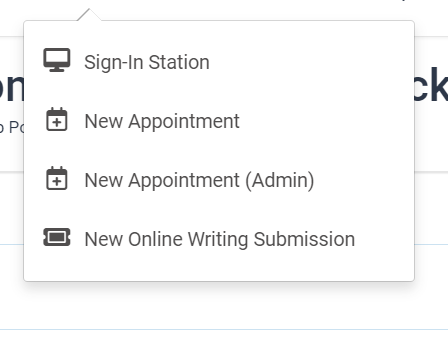
    screen cap of sumitting a new request from the "quick" menu in Accudemia
  3. Complete the submission ticket information, including areas for feedback. Upload your paper (Word documents are preferable).
  4. Click “Create.”

What kinds of projects can I send?

At the Writing Center, our mission is to serve all members of Upper Iowa University by working with them across disciplines, in all modalities, and at any stage of the writing process. This means that we respond to all writers and writing projects.

I’m working on a large project, can I still send it?

With lengthy writing submissions (10 or more double-spaced pages), such as graduate theses, ongoing research, or senior projects, we encourage you to initiate the consultation process early and in stages. Sending your work to us in chapters or sections creates an ongoing dialogue that will allow your consultant, over time, to provide you with more personal, detailed and holistic feedback. This method also gives you the opportunity to incorporate that feedback throughout the writing process, instead of scrambling to make major changes or revisions last minute.

What sort of response can I expect? 

Based on your concerns, your writing consultant will provide personalized feedback detailing three or more opportunities or areas of focus for your revisions. Whenever possible, your consultant will also connect you with further information or resources you may find helpful.

Can I send something again after I revise it? 

Of course! We are here for you at every stage of the writing process, and happy to provide ongoing feedback as you write, reflect and revise. If a writing consultant has already responded to some element of the project you wish to resubmit, please indicate this in your email.